









In today’s blog, we’ll take you through a complete guide for Security Professionals on Thick Client Pentesting . We’ll cover the difference between thick client and thin client apps, the importance of securing thick client applications, and the benefits, challenges, and best practices of performing penetration testing. So, let’s dive in.
History of Thick Clients
Thick clients were generally not used often until the initial increase in personal computer usage. At this point, thin-client architectures became popular because of the cost of providing everyone with more expensive, larger CRT terminals and PCs.
As time went on, however, the use of thick client application became more relevant because they were more responsive without needing a constant server connection. Even though thick clients are much more widespread today, thin clients are also still used.
What is a Thick Client Application?
Thick client in cyber security are those that are installed locally on the user’s desktop or laptop. These apps are full-featured and may function independently of the Internet, as opposed to web applications, which must always be linked to the Internet. Examples of thick client applications include:
- Computer games
- Web browsers
- Music Players
- Tools for video and conversation, such as Zoom, Slack, Teams
Common Architectures of Thick Client Applications:
Thick client applications may have various forms of architectures based on the backend interaction, data storage, and processing. The cognizance of these structures would assist in the evaluation of performance and behaviour of security, particularly in thick client pentesting scenarios.
- Standalone Architecture: Completely operates in the local machine without the need for internet or server connection. This helps in tools such as image editors or calculators, where all the logic and data are local.
- Two-tier applications are stand-alone apps with the server/database and client installed on the same system or internal network. Traffic from the thick client is sent directly to the server, bypassing intermediaries such as the Internet or an application server.
- Three-tier apps: These apps may communicate via the Internet and handle their business logic by an application server. The thick client resides on the user’s desktop, but the application server and database may be elsewhere. HTTP/S protocols are commonly used for network connections and interactions, allowing for standard requests and answers. In addition, certain thick clients may employ other protocols such as FTP/S, TCP, and UDP.
- Service-Oriented Architecture (SOA): Contemporary thick clients can invoke APIs or microservices to complete a particular task. The architecture can be modularly upgraded and can be found in hybrid enterprise settings.
Both structures have impacts on the behaviours of the application in various conditions, and determine which type of test is necessary. As an instance, three-tier and SOA multiplications tend to require network protocol examination as opposed to standalone apps that must offer increased attention to local file and memory analysis.
Also read: How to Choose the Right Penetration Testing Vendor for Your Business.
Thick Client vs Thin Client: Key Differences
Understanding the architectural and operational differences between thick and thin clients is key to recognizing their unique security risks. While both serve as client interfaces in a networked environment, their behavior, dependency, and exposure vary significantly.
Feature | Thick Client | Thin Client |
Processing Power | Most processing happens locally on the user’s machine | Processing occurs on the server side |
Internet Dependency | Works offline, syncs with server when needed | Requires a constant internet connection |
Data Storage | Stores data, config files, and credentials locally | Minimal local storage; data resides on the server |
Performance | Offers better speed and responsiveness for heavy workloads | May experience latency, depending on server performance |
Maintenance | Updates must be installed on each endpoint | Centralized updates and easier patch management |
Security Exposure | Higher risk due to local storage and complex logic | More secure due to centralized control and reduced footprint |
Use Cases | Multimedia editing, finance, healthcare, enterprise software | Webmail, CRM, SaaS dashboards |
Unlike thin clients that are often tested via browser-based tools, thick client testing demands deeper inspection, ranging from file system interactions to memory and binary analysis. Their local behavior, offline modes, and custom protocols widen the attack surface, making tailored penetration testing crucial.
Thick client security services are vital for strengthening these tests and providing complete protection against potential threats.
Understanding Thick Client Application Security Testing
Thick client applications, as you often read, known as desktop apps, are entire computer systems linked to a network. Unlike thin clients, which often lack hard drives and other key functions, thick clients continue to function even when connected to a network.
Thick client application security testing is a process that evaluates the security of desktop applications by identifying vulnerabilities, testing authentication mechanisms, assessing data encryption, addressing security misconfigurations, and investigating network communication to ensure the robustness and integrity of thick client software.
Types of Thick Client Penetration Testing
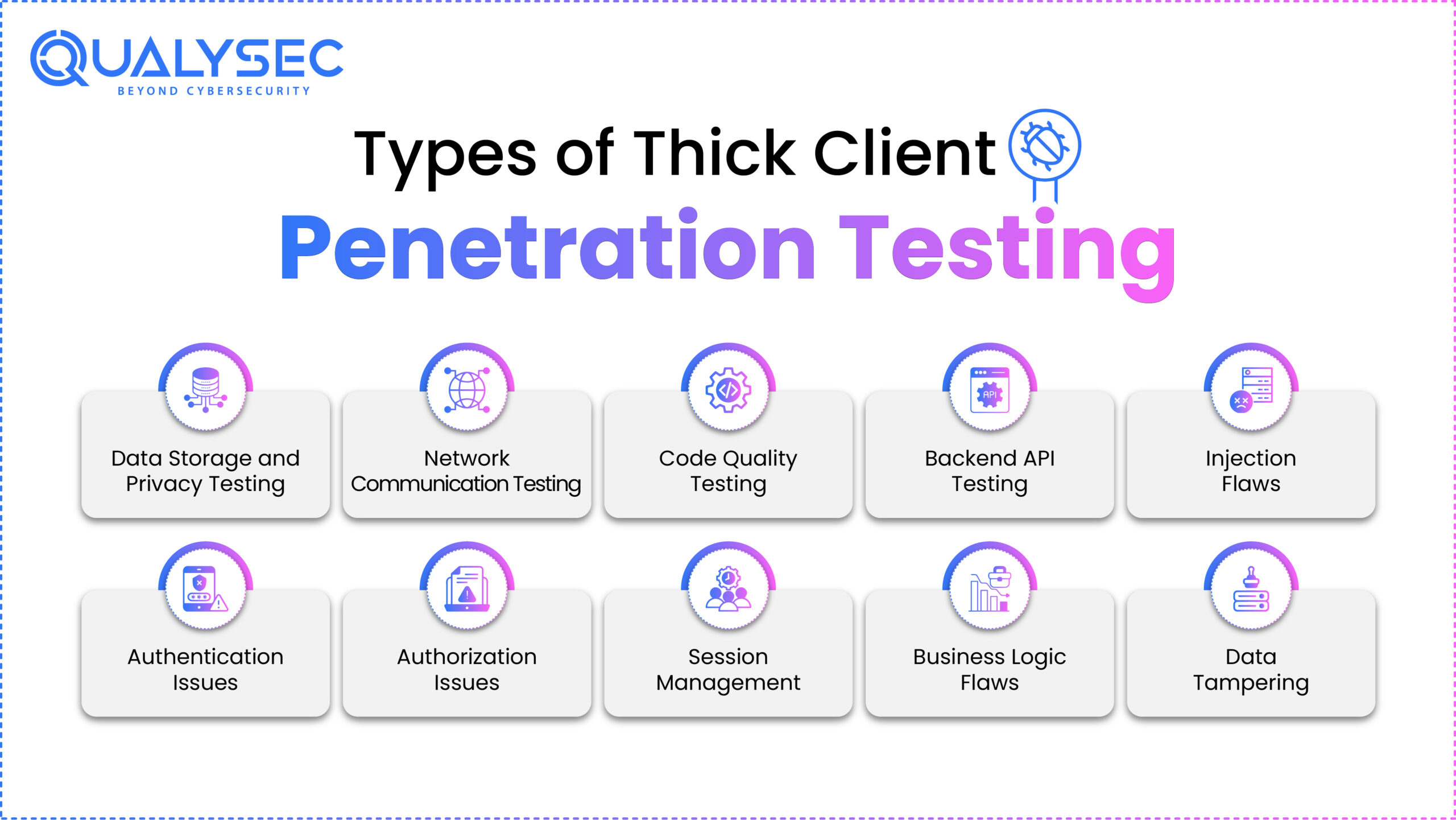
Thick client penetration testing includes a variety of methodologies suited to certain areas of application security. This includes:
1. Data Storage and Privacy Testing
Thick client pen-testing examines how an application manages data storage and privacy. Security specialists analyze whether sensitive information is appropriately encrypted and securely kept, as well as if access restrictions are in place to prevent unauthorized access to personal data. This guarantees that user data is secure from potential breaches and privacy infractions.
2. Network Communication Testing
Thick client penetration testing requires a thorough analysis of network interactions. This includes investigating how data is exchanged between the client and server and ensuring that communication paths are encrypted and safe. Testers examine protocol weaknesses, detect possible eavesdropping hazards, and assess the overall robustness of the network communication infrastructure.
“Read the recommended article on- Network Security Testing“
3. Code Quality Testing
Thick client application penetration testing includes code quality testing, which focuses on looking for vulnerabilities in the application’s source code. Furthermore, this involves detecting and correcting code mistakes, unsafe coding practices, and any vulnerabilities attackers may use to undermine the application’s security.
4. Backend API Testing
Thick client apps frequently rely on backend APIs for many features. Testing these APIs is critical to verifying their security and resistance to threats. Furthermore, security specialists evaluate backend APIs’ input validation, authentication procedures, and data integrity to reduce the risk of exploitation.
“Explore our article about API security testing.”
5. Injection Flaws
Injection holes are a prevalent vulnerability in thick client applications, in which malicious code is injected into the application’s inputs to influence its behaviour. Furthermore, penetration testers check inputs for SQL, operating system, and other injection vulnerabilities to prevent unauthorized access and data modification.
6. Authentication Issues
Thick client penetration testing solves authentication concerns, ensuring only authorized users can access the program. Evaluating password strength, multi-factor authentication, and identifying possible weak areas in the authentication process, all strengthen the overall security posture.
7. Authorization Issues
Authorization concerns require determining if users have the necessary permissions and access levels within the thick client application. Security professionals find and fix holes in authorization procedures to avoid unauthorized activity and data disclosure.
8. Session Management
Testing session management is crucial for thick client applications because it ensures that user sessions are safe and not prone to threats like session hijacking or session fixation. Evaluating how sessions are started, managed, and ended helps to improve the application’s security.
9. Business Logic Flaws
Business logic defects are vulnerabilities that result from faults or holes in the application’s logical operations. Thick client application penetration testing entails studying the application’s business logic to find and correct any weaknesses that might be used to jeopardize the system’s operation.
10. Data Tampering
Thick client programs frequently handle sensitive data; therefore, maintaining its integrity is critical. Penetration testers examine the program for vulnerabilities that might allow data manipulation, guaranteeing that hostile actors cannot change or compromise the integrity of stored data. This involves verifying input data, implementing appropriate encryption, and safeguarding data transfer methods.
There are many more testing types that a thick client application security testing service provider will perform to make sure your app is best secured from cybersecurity threats.
If you want to learn more, contact Qualysec’s security professionals. We have the expertise and experience to secure your desktop applications and data.

Thick Client Pentesting Checklist
A thick client pentesting checklist helps security teams methodically assess each layer of the application. Below is a concise breakdown of essential areas to cover during assessment:
Checklist Item | What to Check |
Map Client-Server Architecture | Understand how the application communicates with backend servers |
Analyze Local Data Storage | Check registry files, local databases, and configuration for sensitive data |
Identify Input Validation Points | Detect missing or improper input sanitization on both client and server sides |
Test API Requests | Assess authentication, rate limiting, and access control in API endpoints |
Simulate Session Hijacking | Evaluate session token handling, expiration, and fixation risks |
Review Binary Files | Look for hardcoded credentials, debug flags, or sensitive logic |
Monitor Network Traffic | Inspect for cleartext data and weaknesses in custom or legacy protocols |
Reverse Engineer Application Logic | Analyze compiled files for authentication flaws or bypass opportunities |
Validate Access Controls | Ensure role-based permissions are enforced consistently |
Check Logs and Error Handling | Identify unfiltered messages or logs that leak internal system info |
Use this thick client pentesting checklist to ensure no layer is overlooked during testing. From network protocols to local storage, each area contributes to a secure and compliant application.
Top Tools for Thick Client Security Testing
Thick client applications require a wide range of tools to analyze binaries, monitor network traffic, inspect memory, and test for authentication or session flaws. Here are some of the most widely used tools for effective security testing:
Tool | Purpose |
Burp Suite | Used for intercepting and modifying HTTP or HTTPS traffic in web-connected thick clients. Particularly helpful for API testing and session management. |
Wireshark | Captures and analyzes network traffic to identify cleartext data transfers, custom protocol usage, or insecure communication patterns. |
Procmon | Monitors file system, registry, and process-level activity on Windows systems to detect unauthorized local storage or abnormal access behavior. |
IDA Pro | A powerful disassembler used to reverse engineer thick client binaries and identify vulnerabilities at the assembly level. |
x64dbg | Useful for debugging and analyzing the execution flow of Windows executables in real time. Helps uncover hidden logic or bypass authentication. |
Echo Mirage | Injects into running processes to intercept and modify function calls, particularly useful for testing encrypted traffic in thick clients. |
Fiddler | Intercepts and inspects HTTP or HTTPS requests and responses. A good choice when dealing with NET-based thick clients. |
Radare2 | An open-source reverse engineering framework that provides deep analysis of binaries with scripting capabilities. |
Sysinternals Suite | A collection of Windows tools, including Process Explorer, TCPView, and Autoruns, that help observe runtime behavior and permissions. |
Ghidra | A free reverse engineering tool developed by the NSA that helps decompile thick client applications and locate security flaws. |
Selecting the right mix of thick client application security testing tools depends on the application’s architecture, the protocols it uses, and the depth of testing required. For most engagements, a combination of dynamic analysis tools and binary reverse engineering platforms offers the most comprehensive coverage.
The Importance of Thick Client Application Testing
Because individuals in this digital age are highly addicted to Android and online apps, security vulnerabilities must be addressed, detected, and resolved to maintain the CIA (Confidentiality, Integrity, and Availability) trinity. Moreover, these applications mature during this security cycle.
So, what about thick client application vulnerabilities or desktop applications?
Still, some firms rely heavily on thick-client software. However, there are no appropriate security standards for thick client penetration testing. As a result, companies have needed help identifying and eliminating security problems. A knowledgeable reverse engineer or attacker who exploits a buffer overflow vulnerability in a client might quickly create a data breach.
Top 5 Benefits of Testing Thick Client Applications:
1. Identifying Vulnerabilities
Thick client programs may have flaws that attackers might use to undermine the system’s security. Insecure coding techniques, poor input validation, and weak encryption systems are vulnerabilities that can be identified during penetration testing.
2. Security Validation
Penetration testing is a method of verifying the security mechanisms used in a thick client application. Furthermore, simulating real-world attack scenarios allows security experts to determine if the existing security measures adequately guard against possible threats and weaknesses.
3. Data Protection
Thick client apps frequently manage sensitive data on the user’s system. Furthermore, penetration testing ensures adequate data protection mechanisms, preventing unauthorized access or alteration of sensitive information stored locally. This is critical for protecting user privacy and compliance with data protection standards.
4. User Authentication and Authorization Testing
Many thick client apps employ user authentication and authorization procedures to manage access to features and data. Penetration testing helps assess these safeguards’ robustness, guaranteeing that only authorized users may access and change the application’s features. This is especially crucial in avoiding unwanted access and privilege escalation.
5. Mitigating Business Risks
Penetration testing for thick client apps enables enterprises to detect and resolve security vulnerabilities before bad actors exploit them. Firms may safeguard their reputation, consumer confidence, and financial assets by reducing these risks. Furthermore, resolving security vulnerabilities before deployment can save resources that would otherwise be used for incident response and recovery.
Step-by-Step Thick Client Penetration Testing Methodology
Thick client pen testing requires a few steps to secure the application. Here’s how the top thick client application security testing company performs penetration testing:
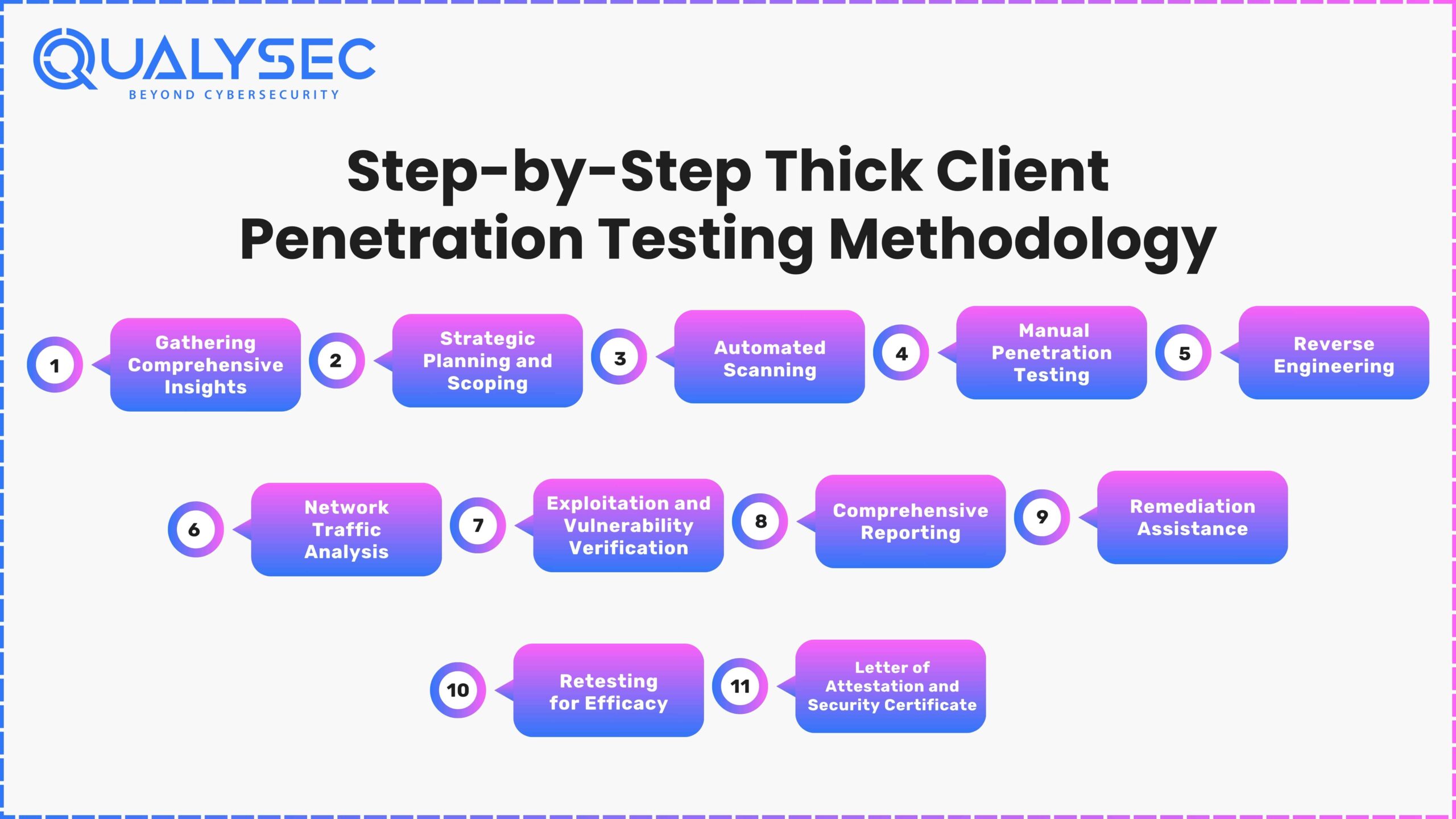
1. Gathering Comprehensive Insights
During the early phase, the primary focus is on gathering vast information. The testing team gathers critical application information in collaboration with the customer. Furthermore, knowing user roles, permissions, and data flows is critical for designing a comprehensive testing strategy.
2. Strategic Planning and Scoping
The penetration testing method begins with thorough planning. The thick client penetration testing services provider looks deeply into the application’s technology and functioning, setting specific objectives and targets. Furthermore, this detailed evaluation allows them to adjust the testing strategy to specific vulnerabilities and threats. A complete penetration testing plan is developed, including scope, methodology, and testing criteria. A high-level checklist serves as a basis, covering important topics such as authentication mechanisms, data processing, and input validation.
3. Automated Scan
An automated and intrusive scan is critical for testing, especially in a staging environment. Specialized tools are used to systematically search for vulnerabilities on the application’s surface. This intrusive scan simulates prospective attackers, finding surface-level vulnerabilities in the staging environment and enabling timely adjustments before deployment in production.
Top Tools to Enhance Your Thick Client Security Testing :
- Burp SuiteWire Shark
- Detect it Easy
- Echo Mirage
- CFF Explorer
- Visual Code Grepper
- DLL Hijack Auditor
4. Manual Penetration Testing
Thick client penetration testing company provides complete manual penetration testing services based on business requirements and security standards. Furthermore, this novel technique enables a comprehensive investigation of possible vulnerabilities across several domains. The testers undertake penetration testing manually, resulting in no false positives. Furthermore, testing occurs on various platforms, including the VAPT web application, mobile apps, cloud, AI/ML, IoT, and API.
5. Comprehensive Reporting
The testing team painstakingly detects and categorizes vulnerabilities, demonstrating a strong awareness of potential hazards. Furthermore, a senior consultant does a high-level penetration test and evaluates the entire report, which contains crucial components like;
- Vulnerability name;
- Likelihood;
- Impact, severity, descriptions, consequences, instances;
- Steps to reproduce;
- Proof of concept; Remediation recommendations;
- CWE No.;
- OWASP TOP 10 Rank;
- SANS Top 25 Rank, and
- References
The report doesn’t end here! Click here to check what else you’ll get with a comprehensive penetration testing report

6. Remediation Assistance
The testing team offers critical remedial help via consultation calls, supporting the development team in replicating or minimizing detected vulnerabilities. Penetration testers communicate with users directly, providing expert advice to help them resolve vulnerabilities quickly and efficiently and improve the program’s overall security posture.
7. Retesting for Efficacy
After the development team has mitigated vulnerabilities, the testers undergo a thorough retesting procedure. Furthermore, the report comprises a history of findings, a state evaluation of each vulnerability, and proof with screenshots to prove the effectiveness of the remedies implemented.
8. Letter of Attestation and Security Certificate
As evidence, the Thick client application testing services provider provides a Letter of Attestation, which certifies your organization’s security level based on penetration testing and security assessments. This letter also serves various objectives, such as validating security levels, demonstrating commitment to security, and resolving compliance requirements. In addition, a Security Certificate is given to boost confidence and satisfy the needs of stakeholders in today’s changing cybersecurity scenario.
Challenges in Thick Client Application Security Testing
Because of their nature, security testing for thick client apps brings unique issues. Here are five issues in thick client application security testing.
1. Low Visibility
Thick client apps store sensitive information locally, making it difficult for security testers to get comprehensive access to its storage and transfer.
Solution: Security testers can use reverse engineering techniques and specialized tools to evaluate the application’s binaries, protocols, and data storage mechanisms to better understand how sensitive information is handled.
2. Lack of standard protocols
Thick client applications may communicate over unique or proprietary protocols, making it difficult to utilize existing security testing tools developed for common protocols such as HTTP.
Solution: Testers must comprehend and reverse engineer the communication protocols utilized by the application. Custom tools may be necessary to carry out security evaluations efficiently.
3. Client-Side Validation
Thick client applications frequently rely on client-side validation, which attackers can modify or circumvent.
Solution: Security testers must focus on server-side validation and conduct extensive testing to guarantee that every input is correctly validated and sanitized. Furthermore, manual testing approaches may be used to uncover and attack client-side vulnerabilities.
4. Offline Functionality
Thick client apps may provide offline capabilities, which allow users to work without an internet connection. When the program is disconnected from the network, monitoring and securing data might be difficult.
Solution: Security testers should evaluate the security of data saved locally for offline use. Static code analysis and penetration testing are two techniques that may be used to find and resolve vulnerabilities in offline functionality.
Thick Client App Pen Testing Best Practices
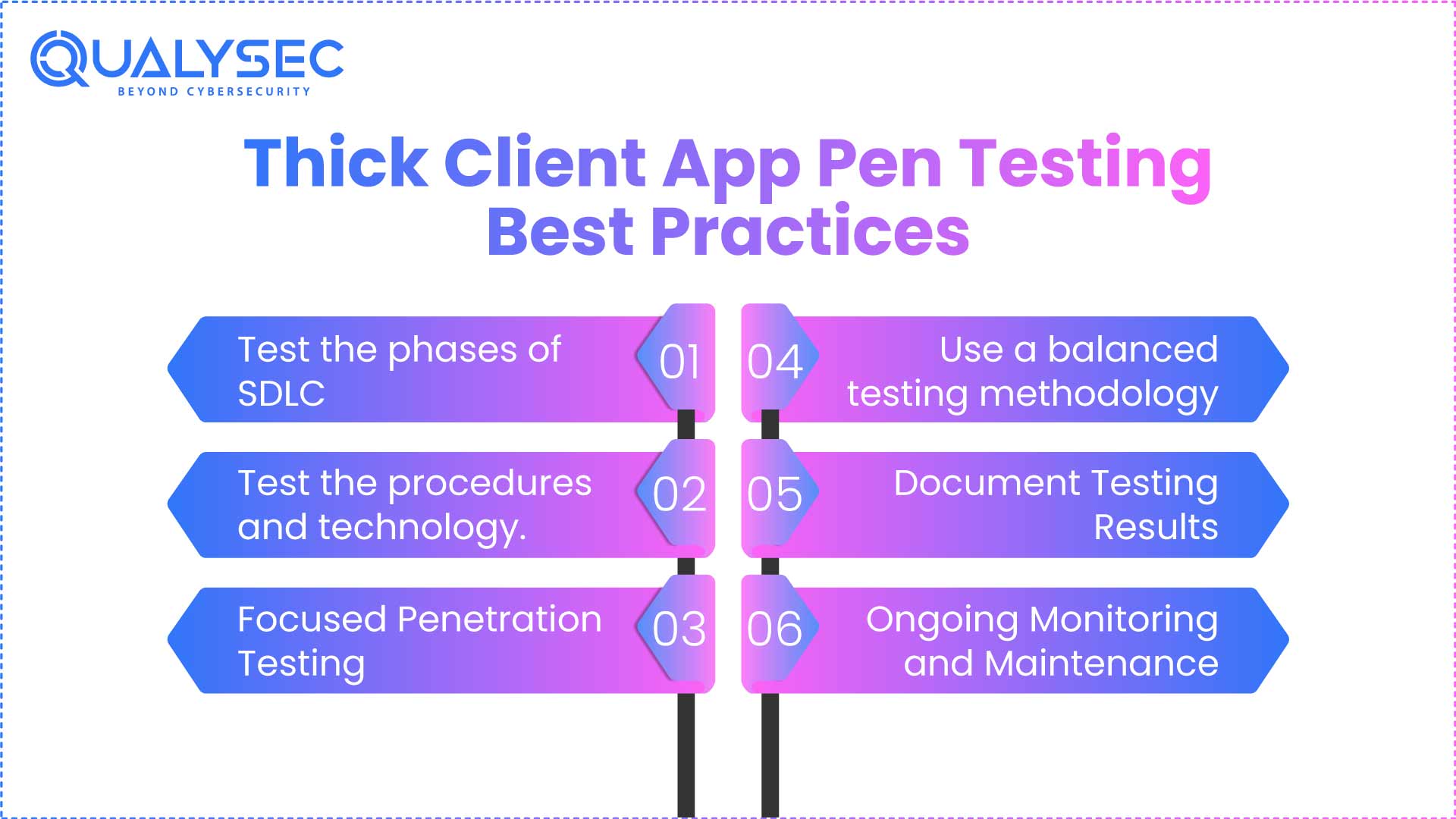
Here are some of the best practices for thick client pen testing:
1. Test the phases of SDLC
Integrating security testing across the SDLC guarantees that security is considered from the first stages of development. Testing at each phase allows you to detect and repair vulnerabilities and weaknesses early on, lowering the danger of security issues being introduced.
2. Test the procedures and technology.
Test all of the aspects that contribute to establishing a successful application. This would entail assessing the knowledge, awareness, and adherence to secure practices of personnel involved in the application’s development and maintenance, assessing the effectiveness of security policies, standards, and guidelines, verifying the implementation of security controls, and evaluating the application’s overall security posture.
3. Focused Penetration Testing
Focused penetration testing entails reviewing vulnerabilities in prior security assessments to ensure they have been effectively addressed. Furthermore, retesting existing vulnerabilities allows you to check the success of remediation efforts and confirm that the discovered flaws have been correctly addressed.
4. Use a balanced testing methodology
Relying entirely on one testing approach will only expose some potential risks. A balanced testing strategy includes manual testing, automatic scanning tools, and technological testing methodologies to provide complete coverage. Manual testing allows for human creativity and intuition, while automated techniques can assist in finding common weaknesses rapidly. Technical testing entails thoroughly examining the application’s design, code, and security measures.
5. Document Testing Results
Documenting the findings, methodology, and suggestions emerging from penetration testing efforts is critical. Furthermore, detailed documentation gives a clear record of detected vulnerabilities, how to duplicate them, and recommendations for remedy. This documentation is a great resource for developers, security teams, and stakeholders safeguarding the thick client application.
6. Ongoing Monitoring and Maintenance
Penetration testing is an ongoing process. Implementing a continuous monitoring and maintenance mechanism for the application’s security is critical. Furthermore, monitor the application for new vulnerabilities and threats regularly and respond quickly to security concerns. Maintain compliance with security updates, patches, and upgrades for the application and its components.
Qualysec Technologies: Enhancing your Thick client applications
This generation is mostly about gaming, which works on PC. Playing is easy- you need to install it and play. But what about its security? Who will secure it? What about the customer data? Worry not; we are here to rescue the businesses.
Qualysec Technologies is a leading cybersecurity company that solely focuses on penetration testing. We are one of the only few companies that offer process-based penetration testing. Our uniqueness lies in our hybrid approach to testing, which combines manual and automated security testing for desktop applications.
We also provide a comprehensive report for the clients to get insights into vulnerabilities found and ways to mitigate them. With our pentest report, your business can achieve compliance like SOC 2, GDPR, PCI DSS, HIPAA, ISO 27001, etc.
Key Advantages:
- Experience: We have tested a wide range of thick customers. We tailor each evaluation to highlight the most relevant risks to your product.
- Comprehensiveness: Our assessment technique, which combines manual and tool-based methods, involves full data analysis, extensive reporting, and practical repair recommendations.
- Flexibility: Each business has a unique risk profile and tolerance. Therefore, we adjust our strategy to your specific requirements.
As a trusted Thick client security vendor, we help businesses protect their desktop applications to ensure they are secure and reliable. If you’re a business with a desktop application, here’s your call to secure it with highly professional testers. Contact us today!
Conclusion
Most low-hanging fruit may be handled if a company implements safe SDLC procedures and integrates security technologies into the SDLC life cycle. In this manner, vulnerabilities are addressed at an early stage of development. Always use a security-by-design approach to ensure your project is secure from conception to completion.
This blog highlighted all you needed about thick client pentesting or thick client application security testing. Now, it’s your turn to take action against cyber attacks and secure your apps ASAP. Reach us today for a secure tomorrow!



















































































































































































































































































0 Comments